前往下载
90

VexMoreEquipment
Vex系列
玄易同志
2025-03-29
资源介绍
前置
必须 VexView2.2以上.jar
属性前置
选择其一 [URL='http://www.mcbbs.net/thread-872287-1-1.html']PlugStats[/URL] [URL='http://www.mcbbs.net/thread-793362-1-1.html']SX-Attribute[/URL]
个人推荐 PlugStats 完美支持,
包括条件限制(等级、职业以及所有注册的条件),
并且完美支持PlugStats 的所有附件、附属,由于PlugStats已经兼容并支持SkillAPI,
故本插件也支持了(使用别的属性不能支持),sx仅完美支持目前帖子的最高版本(2.03)以及附属属性和条件。
本插件为您提供了额外的装备栏拓展,现在与[URL='https://www.vexview.top/index.php?resources/vs-equipment-rpg%E7%A6%8F%E9%9F%B3%EF%BC%81%E5%85%B3%E8%81%94%E5%A5%97%E8%A3%85%EF%BC%81bc%E8%B7%A8%E6%9C%8D%EF%BC%81%E6%8B%93%E5%B1%95%E4%BD%A0%E7%9A%84-%E8%A3%85%E5%A4%87%E6%A0%8F-%E5%90%A7%EF%BC%8C%E6%B7%BB%E5%8A%A0%E6%9B%B4%E5%A4%9A%E8%A3%85%E5%A4%87%E7%B1%BB%E5%9E%8B%EF%BC%81-1-9-1-13.23/']前身[/URL]关联甚微(完全重新的),支持多个属性插件(当然 ,加载属性时只会选用其一属性插件),基本上所有的属性插件都是互不兼容的,所以请不要尝试装入多个属性插件(这很容易产生大量bug)
本插件提供了自定义装备栏的无限拓展(前身仅支持一个),所以呢,我们可以创建无限多个的GUI装备栏(你可以写出饰品栏、符文栏、宝石栏、装备栏、卡牌栏...诸如此类的您能想到的任何装备栏),可以通过配置文件内key为 compares 的位置为对应gui添加自定义组件,下面看图
新画的GUI

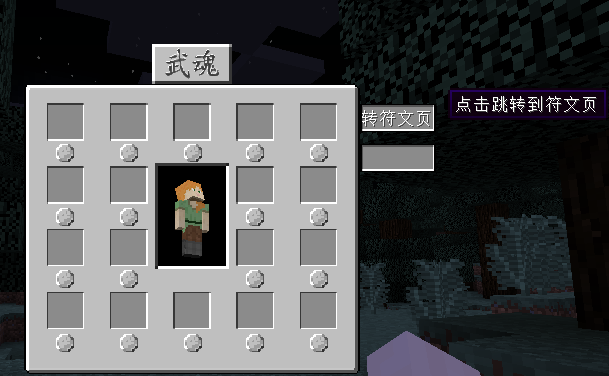
此类配置文件依次类推来写,可以无限拓展玩家装备栏。
可以通过配置文件内key为 compares 的位置为对应gui添加自定义组件
1.完善信息提示
2.群组服支持
3.装备宝石、符文镶嵌插件拓展
4.套装属性支持
5.提供api类支持
必须 VexView2.2以上.jar
属性前置
选择其一 [URL='http://www.mcbbs.net/thread-872287-1-1.html']PlugStats[/URL] [URL='http://www.mcbbs.net/thread-793362-1-1.html']SX-Attribute[/URL]
个人推荐 PlugStats 完美支持,
包括条件限制(等级、职业以及所有注册的条件),
并且完美支持PlugStats 的所有附件、附属,由于PlugStats已经兼容并支持SkillAPI,
故本插件也支持了(使用别的属性不能支持),sx仅完美支持目前帖子的最高版本(2.03)以及附属属性和条件。
本插件为您提供了额外的装备栏拓展,现在与[URL='https://www.vexview.top/index.php?resources/vs-equipment-rpg%E7%A6%8F%E9%9F%B3%EF%BC%81%E5%85%B3%E8%81%94%E5%A5%97%E8%A3%85%EF%BC%81bc%E8%B7%A8%E6%9C%8D%EF%BC%81%E6%8B%93%E5%B1%95%E4%BD%A0%E7%9A%84-%E8%A3%85%E5%A4%87%E6%A0%8F-%E5%90%A7%EF%BC%8C%E6%B7%BB%E5%8A%A0%E6%9B%B4%E5%A4%9A%E8%A3%85%E5%A4%87%E7%B1%BB%E5%9E%8B%EF%BC%81-1-9-1-13.23/']前身[/URL]关联甚微(完全重新的),支持多个属性插件(当然 ,加载属性时只会选用其一属性插件),基本上所有的属性插件都是互不兼容的,所以请不要尝试装入多个属性插件(这很容易产生大量bug)
本插件提供了自定义装备栏的无限拓展(前身仅支持一个),所以呢,我们可以创建无限多个的GUI装备栏(你可以写出饰品栏、符文栏、宝石栏、装备栏、卡牌栏...诸如此类的您能想到的任何装备栏),可以通过配置文件内key为 compares 的位置为对应gui添加自定义组件,下面看图
新画的GUI

此类配置文件依次类推来写,可以无限拓展玩家装备栏。
可以通过配置文件内key为 compares 的位置为对应gui添加自定义组件
PLAINTEXT
     y: 20
    hoverText:
    #️️️️️️️️ {0} 穿上一件/脱下这件
    #️️️️️️️️ {1} 装备name
    - '点击 {0} {1}'

  #️️️️️️️️ 装备槽位
  contains:
    '戒指':
      slotId: 0
      name: '戒指'
      #️️️️️️️️ 判断物品是戒指的依据 判断lore里有没有这个字段
      getLore: '戒指'
      x: 38
      y: 50
    '项链':
      slotId: 1
      name: '项链'
      #️️️️️️️️ 判断物品是项链的依据 判断lore里有没有这个字段
      getLore: '项链'
      x: 38
      y: 92
    '项链1':
      slotId: 2
      name: '项链'
      #️️️️️️️️ 判断物品是项链的依据 判断lore里有没有这个字段
      getLore: '项链'
      x: 38
      y: 133
    '项链2':
      slotId: 3
      name: '项链'
      #️️️️️️️️ 判断物品是项链的依据 判断lore里有没有这个字段
      getLore: '项链'
      x: 38
      y: 173
    '项链3':
      slotId: 4
      name: '项链'
      #️️️️️️️️ 判断物品是项链的依据 判断lore里有没有这个字段
      getLore: '项链'
      x: 92
      y: 50

  #️️️️️️️️ 额外组件
  compares:
    #️️️️️️️️text:
    #️️️️️️️️  '1':
    #️️️️️️️️    x: 120
    #️️️️️️️️    y: 240
    #️️️️️️️️    list:
    #️️️️️️️️    - '测试GUI'
    #️️️️️️️️    hoverText:
    #️️️️️️️️    - '测试GUI'
    #️️️️️️️️    image:
    #️️️️️️️️      '1':
    #️️️️️️️️        #️️️️️️️️ image 普通图片组件 gifimage 动态图片组件, 分割图片组件(暂(一般)不支持)
    #️️️️️️️️        #️️️️️️️️ type : image  gifimage
    #️️️️️️️️        type: image
    #️️️️️️️️        url: '[local]Button.png'
    #️️️️️️️️        x: 88
    #️️️️️️️️        y: 88
    #️️️️️️️️        xs: 100
    #️️️️️️️️        ys: 100
    #️️️️️️️️        hoverText:
    #️️️️️️️️        - '测试GUI'
    #️️️️️️️️button:
    #️️️️️️️️  '1':
    #️️️️️️️️    url1: '[local]Button.png'
    #️️️️️️️️    url2: '[local]Button_.png'
    #️️️️️️️️    name: 'hahaha'
    #️️️️️️️️    x: 20
    #️️️️️️️️    y: 40
    #️️️️️️️️    w: 35
    #️️️️️️️️    h: 12
    #️️️️️️️️    hoverText:
    #️️️️️️️️    - '测试GUI'
    #️️️️️️️️    commands:
    #️️️️️️️️    - '[op]fly {0}'
#️️️️️️️️ 添加物品的gui
AddItemGui:
  #️️️️️️️️ gui 贴图地址
  url: '[local]additem.png'
  x: -1
  y: -1
  w: 238
  h: 191
  xs: 238
  ys: 191
  slotLeft: 40
  slotTop: 113

  #️️️️️️️️ 模型立绘
  playerDraw:
    show: false
    #️️️️️️️️位于gui的x轴坐标
    x: 99
    #️️️️️️️️位于gui的y轴坐标
    y: 166
    #️️️️️️️️大小,30为玩家普通背包显示的大小
    scale: 40

  #️️️️️️️️ 物品添置槽位
  slot:
    x: 111
    y: 32
  #️️️️️️️️ 两个控制的按钮
  button:
    trueButton:
      x: 62
      y: 60
      w: 30
      h: 15
      name: '点击确定'
      url1: '[local]Button.png'
      url2: '[local]Button_.png'
      text:
      - '点击确定'
    falseButton:
      x: 104
      y: 60
      w: 30
      h: 15
      name: '点击取消'
      url1: '[local]Button.png'
      url2: '[local]Button_.png'
      text:
      - '点击取消'
    backButton:
      x: 146
      y: 60
      w: 30
      h: 15
      name: '点击返回'
      url1: '[local]Button.png'
      url2: '[local]Button_.png'
      text:
      - '点击返回'

    #️️️️️️️️ 额外组件
  compares:
    #️️️️️️️️ 支持自行添加书写的额外组件类型: text image button
    #️️️️️️️️text:
    #️️️️️️️️  '1':
    #️️️️️️️️    x: 120
    #️️️️️️️️    y: 240
    #️️️️️️️️    list:
    #️️️️️️️️    - '测试GUI'
    #️️️️️️️️    hoverText:
    #️️️️️️️️    - '测试GUI'
    #️️️️️️️️    image:
    #️️️️️️️️      '1':
    #️️️️️️️️        #️️️️️️️️ image 普通图片组件 gifimage 动态图片组件, 分割图片组件(暂(一般)不支持)
    #️️️️️️️️        #️️️️️️️️ type : image  gifimage
    #️️️️️️️️        type: image
    #️️️️️️️️        url: '[local]Button.png'
    #️️️️️️️️        x: 88
    #️️️️️️️️        y: 88
    #️️️️️️️️        xs: 100
    #️️️️️️️️        ys: 100
    #️️️️️️️️        hoverText:
    #️️️️️️️️        - '测试GUI'
    #️️️️️️️️button:
    #️️️️️️️️  '1':
    #️️️️️️️️    url1: '[local]Button.png'
    #️️️️️️️️    url2: '[local]Button_.png'
    #️️️️️️️️    name: 'hahaha'
    #️️️️️️️️    x: 20
    #️️️️️️️️    y: 40
    #️️️️️️️️    w: 35
    #️️️️️️️️    h: 12
    #️️️️️️️️    hoverText:
    #️️️️️️️️    - '测试GUI'
    #️️️️️️️️    命令前缀 添加[op]  则点击按钮的玩家以op身份执行命令
    #️️️️️️️️    命令前缀 添加[console]  则控制台执行命令
    #️️️️️️️️    否则以玩家身份执行命令
    #️️️️️️️️    commands:
    #️️️️️️️️    - '[op]fly {0}'
1.完善信息提示
2.群组服支持
3.装备宝石、符文镶嵌插件拓展
4.套装属性支持
5.提供api类支持
作者信息
玄易同志
网站的个人号~